

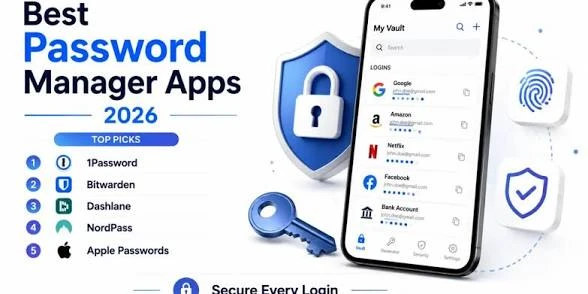

Every major data breach headline has the same footnote buried somewhere in the article: most victims were using a password they’d already reused somewhere else. It’s the single most common security mistake, and it’s also the easiest one to fix — you just need one good tool doing the remembering for you instead of your brain.
The best password managers in 2026 do more than store logins — they’re what stops a single breach from taking down your entire digital life.
(hackers testing leaked passwords across hundreds of sites automatically) more automated than ever, using the same password twice is one of the fastest ways to lose control of your accounts. Here’s how to pick a manager that actually protects you, not just one that looks convenient.
What a Password Manager Actually Protects You From
A password manager does three things well: it generates long, random, unique passwords for every account you own, stores them behind one master password, and autofills them so you never have to type — or remember — them again.
The real protection comes from uniqueness. If one site you use gets breached, a unique password means the damage stops at that one account instead of spreading to your email, banking, and social media too.
What to Look For Before Choosing One
Zero-knowledge encryption. This means even the company running the password manager can’t see your stored passwords — only you can decrypt them, using your master password. Never trust a provider that can’t clearly explain this.
Cross-platform sync. Your passwords need to follow you across your phone, laptop, and browser without manual exporting. Check that the free tier actually includes syncing — some cheaper plans lock this behind a paywall.
Built-in breach monitoring. The best password managers now alert you automatically if one of your saved logins appears in a known data breach, so you can change it before it’s exploited.
Two-factor authentication (2FA) support. Look for a manager that can also store or generate 2FA codes, so your extra layer of security lives in one place instead of scattered across separate authenticator apps.
A genuinely usable free tier. Some free plans limit you to one device or a small number of saved passwords. Know the limits before you commit your entire digital life to one.
Top Password Managers Worth Considering
Best Overall
A password manager with strong zero-knowledge encryption, unlimited password storage on its free tier, and reliable cross-device sync covers the needs of most people without asking for a subscription. Built-in breach alerts push it ahead of similar free options.
Best Free Option
Some managers offer a genuinely unlimited free tier — unlimited passwords and devices — with fewer of the sync restrictions that competitors typically build into their free plans. The tradeoff is usually a simpler interface with fewer extra features.
Best for Families
Family plans that let you share select passwords securely with a partner or kids — without exposing your entire vault — are worth the small added cost if multiple people in your household need managed logins.
Best for Built-In Browser Users
Browser-based password managers (like the ones built into Chrome or Safari) have improved significantly and now offer basic breach alerts and sync. They’re a reasonable starting point, but generally lack the advanced sharing and 2FA features of a dedicated app.
Best for Security-Focused Users
For anyone who wants maximum control, an open-source password manager lets independent security researchers verify exactly how your data is encrypted — appealing if you don’t want to simply trust a company’s word for it.
Common Mistakes to Avoid
Choosing a weak master password.
Your master password is the one you still have to remember, and it’s the single point of failure protecting everything else. Make it long, unique, and never reused anywhere else.
Skipping two-factor authentication on the vault
itself. Even the best password manager is only as secure as its own login. Enable 2FA on the manager itself, not just on the accounts stored inside it.
Assuming “free” means limited forever.
Some free tiers are permanently generous; others are aggressive trial periods designed to convert you to paid. Read the actual terms, not just the marketing page.
Ignoring browser-saved passwords after switching.
If you migrate to a dedicated password manager, make sure to delete old passwords saved directly in your browser — leaving both creates confusion and a weaker fallback point.
The Bottom Line
The best password manager in 2026 isn’t necessarily the one with the most features — it’s the one you’ll actually use consistently across every account you own. Start by moving your most sensitive accounts (email, banking, and any account tied to two-factor recovery) into a manager first, then migrate the rest over time. Once your passwords are secured, revisit our guide on free VPNs to round out the rest of your privacy setup.
Looking for more free tools to make your day-to-day easier? https://fast-convert.net offers a range of free browser-based utilities, including fast and simple file conversions with no installation required.
Published: August 23, 2026 — From James Carter — Your trusted source for honest tech guides